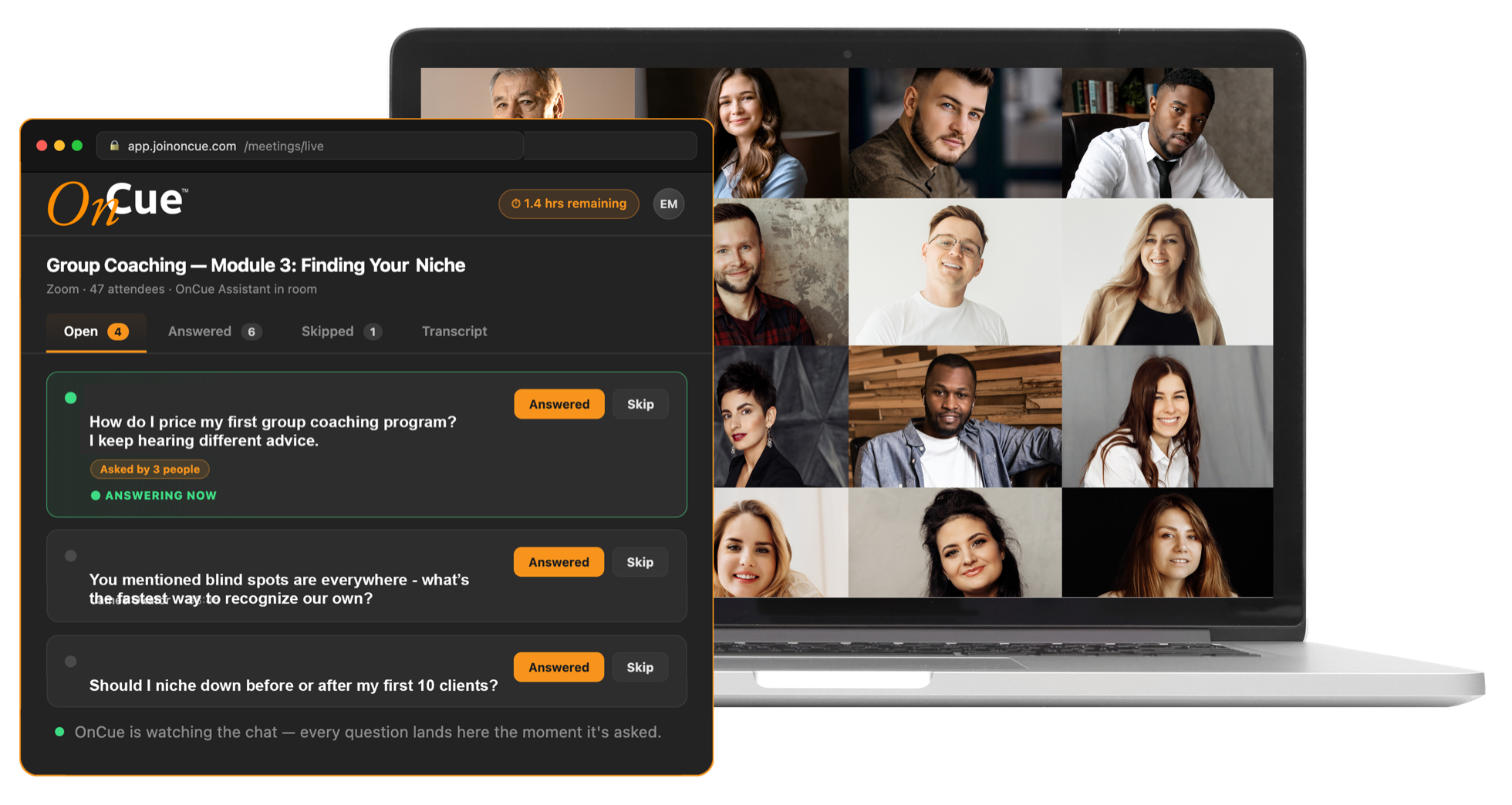
OnCue is the AI production assistant for live sessions — it catches every question, tracks your transcript, and delivers the follow-up, so you can just teach.
Works with Zoom, Google Meet, and Microsoft Teams. No downloads for your attendees — just paste your meeting link.
The Problem
You know that moment.
You’re mid-teach, deep in the material, fully present with your audience — and somewhere in the chat, a great question just scrolled past. Someone’s stuck in the waiting room. Someone’s mic is picking up a barking dog. You’re the host, the teacher, the producer, and the tech support, all at once.
The best facilitators have always had help — a producer backstage running the room so the person on stage can shine. Most of us run it alone.
Not anymore.
How It Works
Three steps. Zero extra tabs.
01
Paste your meeting link.
Zoom, Google Meet, or Teams. OnCue joins in seconds as a silent, professional participant — “Your Assistant” right there in the attendee list.
02
Teach. That’s it.
OnCue watches the chat, catches every real question, and lines them up on your private dashboard — on your second screen, tablet, or phone. Tap a question when you’re answering it. Nothing slips by.
03
Get the follow-up, done.
Minutes after the session ends: full transcript, every question with the answer you gave, session summary, and attendance — delivered to your inbox, ready to share.
The Dashboard
Your backstage command center — anywhere.
The OnCue dashboard runs in any browser, on any device. Second monitor, tablet, phone — or your VA’s laptop across the country. Questions appear the moment they’re asked. Mark them answered, skip them, or save them for later. Everything syncs instantly, everywhere.
Every question, caught
AI separates real questions from chatter.
The green light
One tap marks what you’re answering; OnCue captures your spoken answer from the transcript.
Your Q&A library
Download every question and the answer you gave, session after session. Learn what your audience keeps asking. Never rebuild an FAQ from memory again.
“Can we get a recording?”
“What’s the pricing tier?”Open
“Is this seat pooled?”Answered
Plans
Start with Listener. Grow into the room.
Every tier builds on the last — pick the level of help your sessions need today.
Available in beta
Listener
Never miss a question again.
Your silent Q&A assistant. Joins any meeting, watches the chat, and runs your private question queue — plus live transcript, session summary, and attendance report delivered after every session.
✓Joins Zoom, Meet & Teams from a link
✓Real-time question detection & queue
✓Live transcript with speaker names
✓Q&A capture — your spoken answers, saved with their questions
✓Post-session package by email: transcript, Q&A, summary, attendance
Everything in Listener — plus co-host powers. OnCue admits attendees from the waiting room, manages mutes and background noise, keeps you on schedule against your agenda, drops your links and worksheets into chat on time, and tracks who’s engaged.
✓Waiting room admission against your registration list
Full co-host powers on Zoom; vigilant monitoring mode on Meet & Teams.
Coming soon
Emcee
A co-host with a voice — and a face when you want one.
Everything in Producer — plus presence. OnCue speaks: it reads questions aloud on your cue (“We have a question from Maria…”), opens and closes your sessions, announces breaks, and runs your hand-raise queue — bringing attendees on stage, unmuted and spotlighted, one at a time. Flip on the avatar and your assistant appears on camera: a stock persona, your branded character, or a digital twin of you.
✓FAQ auto-answer from your knowledge base — built automatically from your past Q&As
✓On-camera avatar: per-meeting toggle (uses hours at 3x)
$99/seat/month
10 pooled hours per seat included
Simple, honest pricing. Seats are for the people on your team who run sessions. Hours are pooled across your whole team — split them however your month actually goes. Add seats or hour blocks anytime. Unused hours roll over one month.
And one promise above all: OnCue never interrupts a live session. No cutoffs, no upgrade pop-ups mid-meeting. If you run over your hours during a session, it simply finishes — you settle up after. Your room is sacred.
Who It’s For
Built for the people who run live rooms.
Coaches & certification programs
Every cohort question captured, attendance for your records, Q&A libraries that compound.
Course creators & trainers
Teach the material, not the chat window.
Community leaders & facilitators
Workshops, masterminds, AMAs, town halls.
Webinar & event teams
Give every speaker a producer, without hiring one per room.
Why I Built This
“When I taught a certified business coach program for Mindvalley, I never ran a session alone — a production assistant admitted attendees, managed mutes, and made sure no question ever got lost. It changed how I taught: I could be fully present, because someone had the room.”
Most coaches, trainers, and facilitators never get that. OnCue is that assistant — for everyone.
— Eric Markowitz, creator of OnCue
FAQ
Questions, answered.
No. OnCue joins your meeting like any participant. Your attendees just see a tidy assistant tile in the list — you can even upload your own logo and name for it.
Zoom, Google Meet, and Microsoft Teams — paste any meeting link. Co-host powers (Producer & Emcee) are strongest on Zoom.
OnCue reads the meeting chat in real time and puts genuine questions on your private dashboard — open it on a second screen, tablet, or phone. Attendees just type in chat like they always do.
OnCue transcribes your session to power the question capture, Q&A pairing, and your post-session package. All platforms display their standard recording/notification indicators to attendees, and transcription is a per-meeting toggle you control.
Nothing — that's the promise. Your session always finishes. We'll square up afterward, and you can enable auto-refill so it never comes up.
Your meetings, transcripts, and questions belong to you and are visible only to your account. We don't train AI models on your sessions.
Full access to Listener with 2 free session-hours — no credit card required. Beta members get founder pricing when paid plans launch, and a direct line to shape what we build next.